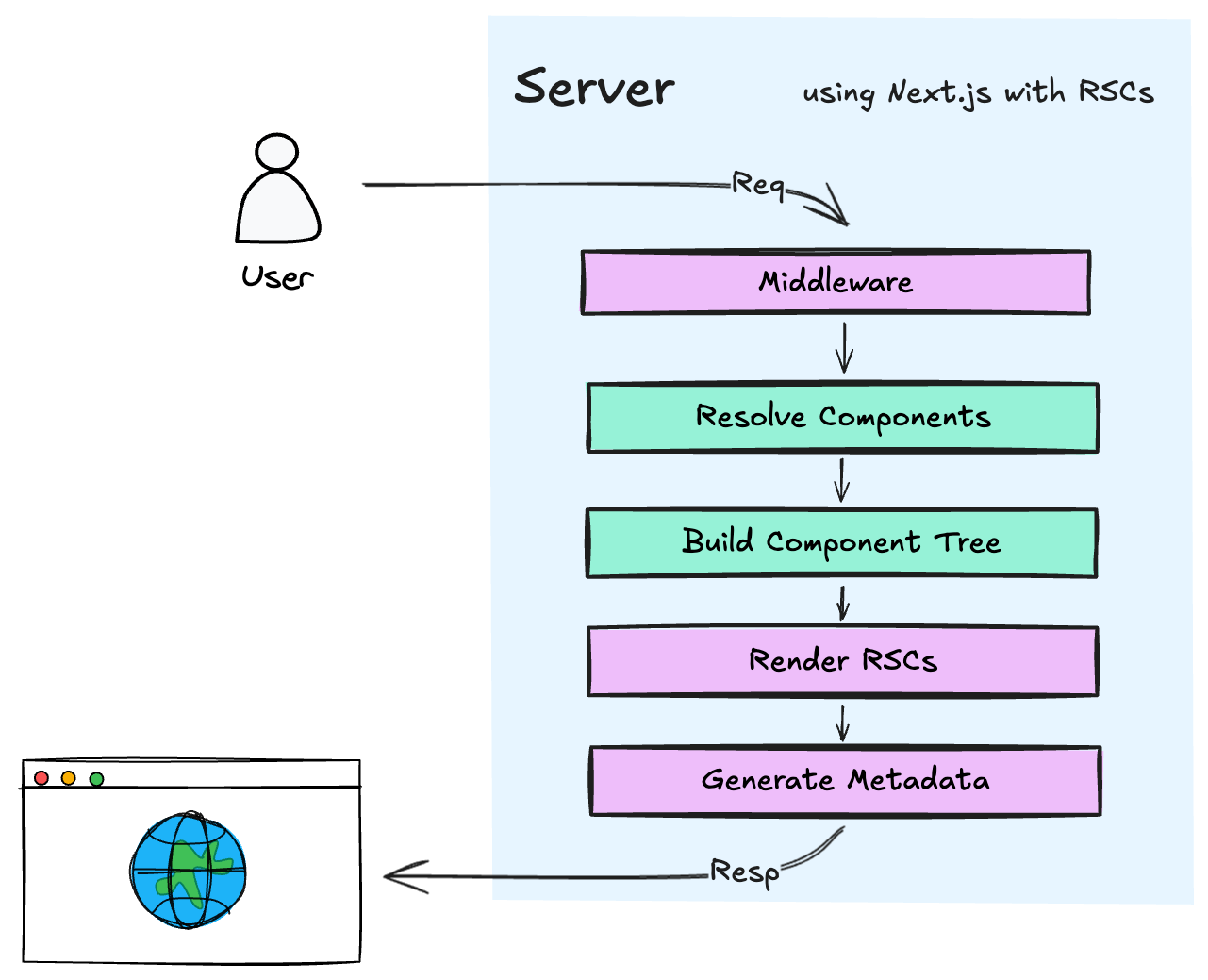
Suggest an editImprove this articleRefine the answer for “App Router vs Pages Router in Next.js”. Your changes go to moderation before they’re published.Approval requiredContentWhat you’re changing🇺🇸EN🇺🇦UAPreviewTitle (EN)Short answer (EN)**App Router vs Pages Router in Next.js**: Pages Router uses the `pages/` directory where components run in the browser and server data arrives through `getServerSideProps`. App Router uses `app/` where every component is a React Server Component by default, data fetches inside `async` components, and layouts nest automatically via `layout.tsx`. Use App Router for new projects.Shown above the full answer for quick recall.Answer (EN)Image**App Router vs Pages Router in Next.js** - two routing systems in the same framework that disagree about one thing: where rendering happens. Pages Router assumes the browser does the work and calls server helpers when needed. App Router assumes the server does the work and lets the browser opt in. ## Theory ### TL;DR - Analogy: Pages Router is a restaurant where you order at the table and wait for the kitchen. App Router is a buffet where plates arrive pre-assembled from the server. - Pages Router ships a full JS bundle to the browser for hydration. App Router streams server-rendered HTML and only hydrates parts marked `'use client'`. - The entire API difference in one line: `getServerSideProps` vs `async` component. - New project: App Router. Existing project on Pages: migrate gradually, one route at a time. Both coexist in the same repo. - Streaming, nested layouts, Server Actions, and partial prerendering all live on the App Router side only. ### Quick example Pages Router fetches data outside the component and passes it down as props: ```tsx // pages/posts/[id].tsx export async function getServerSideProps({ params }) { const post = await fetch(`https://api.itlead.org/posts/${params.id}`).then(r => r.json()) return { props: { post } } // serialized to JSON, sent to client } export default function PostPage({ post }) { return <h1>{post.title}</h1> // runs in browser after full hydration } ``` App Router merges data fetching into the component: ```tsx // app/posts/[id]/page.tsx export default async function PostPage({ params }) { const post = await fetch(`https://api.itlead.org/posts/${params.id}`).then(r => r.json()) return <h1>{post.title}</h1> // streamed as HTML, no full bundle hydration } ``` The App Router version has no exported helper and no props interface. The `fetch` call runs on the server and never appears in the client bundle. ### Key difference Pages Router treats data fetching as a file-level export that runs before the component renders. The component itself is always a client component and ships to the browser. App Router makes async server components the default: they fetch their own data, run on the server, and send HTML. The browser only hydrates parts explicitly marked `'use client'`. Everything else stays as static markup. ### When to use - New project with SEO requirements: App Router. Server rendering plus streaming improves LCP on dynamic content. - Legacy codebase pre-Next.js 13: keep Pages Router and migrate new routes to `app/` gradually. - Static export (`output: 'export'`): Pages Router only. React Server Components are not compatible with static export mode. - Team new to React Server Components: Pages Router is easier to reason about while the team gets familiar with the RSC model. ### Side-by-side table | Feature | Pages Router (`pages/`) | App Router (`app/`) | |---|---|---| | Introduced | Next.js 9 (2019), default until 13 | Next.js 13 (2023), stable 13.4+, default in 14+ | | Default component | Client component | React Server Component | | Data fetching | `getStaticProps`, `getServerSideProps` | `async` components with `fetch` | | Layouts | Global `_app.tsx` | Nested `layout.tsx` at any depth | | Loading UI | Manual state management | `loading.tsx` with Suspense built in | | Error handling | Global `_error.tsx` | Per-route `error.tsx` | | Streaming | Not supported | Yes, via `<Suspense>` and `loading.tsx` | | Metadata | `<Head>` component | `generateMetadata` per route | | Mutations | API route plus client `fetch` | Server Actions with `'use server'` | | Bundle size | Larger (full hydration) | Smaller (server components stay on server) | | Caching | Manual | Automatic via `fetch` options | | When to use | Legacy apps, static exports | New apps, dynamic UIs, colocation | ### How a request flows through each router For Pages Router on an SSR request: run `getServerSideProps` on the server, serialize the return value to JSON, send props to the client, hydrate the full component tree with React's `hydrateRoot`. Every page ships its source to the browser even if the content never changes after load. App Router works differently. Next.js scans the `app/` tree at build time and generates a route manifest. On a request: 1. Next.js walks the folder from root, collecting every `layout.tsx` along the path to the matched route. 2. Every component on that path runs on the server. Async components pause at `await` while the runtime streams ready HTML to the browser incrementally. 3. Components marked `'use client'` are serialized with their props as an RSC Payload (via React Flight over HTTP) and sent to the browser. 4. The browser hydrates only those client components. Server components stay as pure HTML and never touch the React runtime in the browser. One practical consequence: `fetch` inside App Router components is patched by Next.js. Identical fetch calls across multiple components in the same request are deduplicated automatically. If two components hit the same URL, only one network request goes out. Pages Router has no equivalent for this. ### Data fetching as a component concern Pages Router forces data fetching to the file level. You write `getServerSideProps` or `getStaticProps` as named exports, return `{ props }`, and the page receives those props. It worked, but sharing fetch logic between a page and a deeply nested component was awkward. All data had to flow down from the top. App Router lets any component be `async`. A layout can fetch. A page can fetch. A deeply nested server component can fetch independently. Each `await` is processed in parallel where possible, and Next.js can start streaming the parts that are ready while the slower parts keep loading. Data lives next to the component that uses it, not hoisted to the top of the file tree. One thing to watch: `fetch` responses are cached by default in App Router. Use `{ next: { revalidate: 3600 } }` for time-based revalidation or `{ cache: 'no-store' }` when you always need fresh data. ### Common mistakes **Marking the whole page with `'use client'`** ```tsx 'use client' // wrong: entire page ships as client bundle export default function Page() { const [open, setOpen] = useState(false) return <div>...</div> } ``` This cancels the RSC benefit. The whole file ships to the browser, bundle size roughly doubles, and TTFB increases because the server cannot stream HTML before the client JS executes. Extract the stateful part into a small child component and mark only that file `'use client'`. The page itself stays a server component. **Using `useState` or `useEffect` in an App Router page** ```tsx // wrong: hooks are not available in React Server Components export default function Page() { const [data, setData] = useState(null) useEffect(() => { fetchData().then(setData) }, []) // build error } ``` Server components are `async` functions, not React components in the traditional sense. `useState`, `useEffect`, and `useContext` all throw a build error inside `app/`. Use `async`/`await` instead: ```tsx export default async function Page() { const data = await fetchData() // runs on server, no hook needed return <div>{data.title}</div> } ``` **Expecting `_app.tsx` providers to work inside `app/`** In hybrid mode, `pages/_app.tsx` and `app/layout.tsx` run in separate contexts. A React Context provider added to `_app.tsx` is not visible inside any `app/` route. Auth providers and theme providers must be either duplicated or moved entirely to `app/layout.tsx` once migration is complete. This trips up almost every team on their first hybrid project. **Missing `fallback` in Pages Router dynamic routes** ```tsx export async function getStaticPaths() { return { paths: [...], fallback: false } // 404 for paths not pre-built at build time } ``` `fallback: false` works for content that never grows after deployment. For anything that adds new paths over time, use `fallback: 'blocking'` to enable on-demand static generation without the flash of a loading state. ### Real-world usage - Vercel's own dashboard: App Router with nested layouts sharing navigation and streaming for live metrics. - Linear: App Router parallel routes for issue modals that render over the list without a full page reload. - Supabase dashboard: App Router server `fetch` for realtime database queries colocated with the components that display them. - T3 Stack (`create-t3-app`): App Router by default since v10, paired with tRPC and RSC. - Stripe Dashboard: hybrid mode, actively migrating to App Router for the payments UI that benefits from server component rendering. ### Follow-up questions **Q:** Why can't you use `getServerSideProps` inside `app/`? **A:** It is a Pages Router convention that Next.js only reads inside `pages/`. The App Router equivalent is an `async` component that fetches its own data directly. The two conventions are intentionally separate, not interchangeable. **Q:** If I mark a component `'use client'`, can it still receive server-fetched data? **A:** Yes. A server component can render a `'use client'` child and pass server-fetched data as props. Strings, numbers, plain objects, and arrays serialize cleanly across the boundary. Functions do not, so you cannot pass a fetch function as a prop. You wrap it in a Server Action with `'use server'` instead. **Q:** How does Next.js deduplicate fetch requests in App Router? **A:** `fetch` is patched in the App Router context. Calls with the same URL and options within the same render pass are deduplicated automatically. Only one network request actually goes out, regardless of how many components call it. **Q:** Can Pages Router and App Router coexist in one project permanently? **A:** Technically yes, Next.js supports it. In practice, sharing auth providers, session state, and layout logic across both gets complicated quickly. Most teams treat hybrid mode as a migration phase rather than a permanent architecture. **Q:** What breaks when you deploy App Router to the Edge runtime? **A:** No Node.js APIs. `fs`, `crypto`, and anything that depends on Node internals will throw at runtime on the Edge. Libraries like Prisma need adapter packages such as `@prisma/adapter-edge` to work. Use Web API equivalents or restrict Edge deployment to routes that do not depend on Node-specific code. ## Examples ### Posts list in both routers ```tsx // pages/posts/index.tsx (Pages Router) import type { GetServerSideProps } from 'next' type Post = { id: string; title: string } export const getServerSideProps: GetServerSideProps = async () => { const res = await fetch('https://api.itlead.org/posts') const posts: Post[] = await res.json() return { props: { posts } } } export default function PostsPage({ posts }: { posts: Post[] }) { return ( <ul> {posts.map((post) => ( <li key={post.id}>{post.title}</li> ))} </ul> ) } ``` ```tsx // app/posts/page.tsx (App Router) import { db } from '@/lib/db' export default async function PostsPage() { const posts = await db.post.findMany({ orderBy: { createdAt: 'desc' } }) return ( <ul> {posts.map((post) => ( <li key={post.id}>{post.title}</li> ))} </ul> ) } ``` The App Router version has no exported helper, no separate data function, and no props interface. The database import lives in the page file and stays on the server. That last part is what changes your bundle size in production. In Pages Router you would have to keep the `db` import inside `getServerSideProps` and pass data through props to avoid leaking the driver to the browser. ### Nested layout with streaming ```tsx // app/dashboard/layout.tsx import { Sidebar } from '@/components/sidebar' export default function DashboardLayout({ children }: { children: React.ReactNode }) { return ( <div className="dashboard"> <Sidebar /> <main>{children}</main> </div> ) } ``` ```tsx // app/dashboard/loading.tsx import { DashboardSkeleton } from '@/components/dashboard-skeleton' export default function Loading() { return <DashboardSkeleton /> } ``` ```tsx // app/dashboard/page.tsx import { getRecentActivity } from '@/lib/activity' export default async function DashboardPage() { const activity = await getRecentActivity() return ( <section> <h1>Recent activity</h1> <ul> {activity.map((item) => ( <li key={item.id}>{item.description}</li> ))} </ul> </section> ) } ``` On navigation to `/dashboard`, Next.js renders the layout and sidebar immediately, then shows `DashboardSkeleton` while `getRecentActivity()` is pending. When data arrives, the skeleton swaps for real content. The sidebar never re-renders because layouts preserve state across navigation within their subtree. In Pages Router you wire all of this yourself with `useState`, a spinner, and a `useEffect` fetch on mount. These three files replace all of that, and each one is cached independently. ### Server and client components in one page Common interview scenario. What needs `'use client'` here, and what does not? ```tsx // app/search/page.tsx import { searchPosts } from '@/lib/search' import { SearchInput } from './search-input' export default async function SearchPage({ searchParams, }: { searchParams: { q?: string } }) { const query = searchParams.q ?? '' const results = query ? await searchPosts(query) : [] return ( <div> <SearchInput initialQuery={query} /> <ul> {results.map((post) => ( <li key={post.id}>{post.title}</li> ))} </ul> </div> ) } ``` ```tsx // app/search/search-input.tsx 'use client' import { useState } from 'react' import { useRouter } from 'next/navigation' export function SearchInput({ initialQuery }: { initialQuery: string }) { const [value, setValue] = useState(initialQuery) const router = useRouter() return ( <input value={value} onChange={(e) => setValue(e.target.value)} onKeyDown={(e) => { if (e.key === 'Enter') router.push(`/search?q=${value}`) }} placeholder="Search..." /> ) } ``` The page is a server component: reads `searchParams`, calls `searchPosts` on the server, renders results. `SearchInput` needs `'use client'` because it uses `useState` and `useRouter`. The page passes `initialQuery` as a prop, and that is fine because strings serialize cleanly across the boundary. The part many teams get wrong on first migration: you cannot pass `searchPosts` itself as a prop to the client component. Functions do not serialize. If the client needed to trigger search directly, you would wrap `searchPosts` in a Server Action with `'use server'` and pass the action as the prop. That is the split most teams misread their first time through.For the reviewerNote to the moderator (optional)Visible only to the moderator. Helps review go faster.