App Router vs Pages Router in Next.js
App Router vs Pages Router is the routing decision every new Next.js project makes. Pages Router is the older client-first system where every page renders in the browser and pulls server data through helpers like getServerSideProps. App Router is the newer system, introduced in Next.js 13 and stable since 13.4, where every component is a React Server Component by default, data fetches happen inside async components, and layouts nest automatically.
Theory
Map: two routers, one goal
Both routers solve the same problem, turn a folder of files into a running web app. They just disagree about where the work happens. Pages Router runs the component on the client and calls a helper on the server when you need data. App Router runs the component on the server and only ships a slice of markup to the client.
We will cover five things in order. Why the second router exists. How each one maps files to URLs. The minimum code to get one route running in each. A side-by-side table. And the misconceptions that trip people up on interviews and inside real migration projects.
Why Next.js shipped two routers
Pages Router served Next.js well for years. The problem was that every page was a client component, even if it only displayed static data. That meant the browser had to download React, hydration code, and any library a page imported, even for a page that never re-renders. It also meant data fetching lived in awkward helper functions (getServerSideProps, getStaticProps) that could not share state with the component they fed.
The React team solved this with Server Components, components that run on the server, send HTML to the browser, and never ship their source. Pages Router could not adopt that model cleanly because its mental model assumed everything is a client component. App Router is a rebuild around the Server Component model from day one.
This comes up on almost every Next.js interview right now. The interviewer is not asking about the directory name, they are checking whether you understand why the old model needed replacing.
Side-by-side in one table
| Aspect | Pages Router | App Router |
|---|---|---|
| Directory | pages/ | app/ |
| Default component kind | Client (React component) | Server (React Server Component) |
| Data fetching | getServerSideProps, getStaticProps, getInitialProps | async components with fetch, plus Server Actions |
| Layouts | One global wrapper in _app.tsx | Nested layout.tsx at any depth |
| Loading UI | Write your own | loading.tsx file with Suspense built in |
| Error boundaries | Global _error.tsx | Per-route error.tsx |
| Streaming | Not supported | Yes, through <Suspense> and loading.tsx |
| Metadata | Custom Head component | generateMetadata function per route |
| Form handling | API routes plus fetch on the client | Server Actions, no separate API route |
| Server mutation | API route plus form POST | 'use server' function, returns to the component |
How each router maps files to URLs
Pages Router uses pages/ and turns every .tsx file into a route. pages/index.tsx becomes /, pages/problems/index.tsx becomes /problems, pages/[id].tsx becomes /:id. Special files start with underscores: _app.tsx wraps everything, _document.tsx rewrites the HTML shell, _error.tsx handles exceptions globally.
App Router uses app/ and a different convention. Routing is driven by files with fixed names: page.tsx, layout.tsx, loading.tsx, error.tsx, not-found.tsx, template.tsx. The folder structure still forms the URL, so app/problems/page.tsx becomes /problems. But the routing files can only sit inside files with those specific names. This is how Next.js knows a file is a route, a layout, or a loading state without underscores or other marker conventions.
A minimal route in each router
Pages Router, with server-side data:
// pages/problems/index.tsx
export async function getServerSideProps() {
const res = await fetch('https://api.itlead.org/problems')
const problems = await res.json()
return { props: { problems } }
}
export default function ProblemsPage({ problems }) {
return (
<ul>
{problems.map((p) => (
<li key={p.id}>{p.name}</li>
))}
</ul>
)
}App Router, same route:
// app/problems/page.tsx
import { db } from '@/lib/db'
export default async function ProblemsPage() {
const problems = await db.problem.findMany()
return (
<ul>
{problems.map((p) => (
<li key={p.id}>{p.name}</li>
))}
</ul>
)
}Two differences in this small example pay for themselves every day. The App Router version does not have a separate getServerSideProps function because the component itself runs on the server. It also imports @/lib/db directly into the page file, and that import never reaches the client bundle. In Pages Router you would have to keep database imports inside the helper and pass data through props to avoid leaking the driver to the browser.
What happens when the app starts
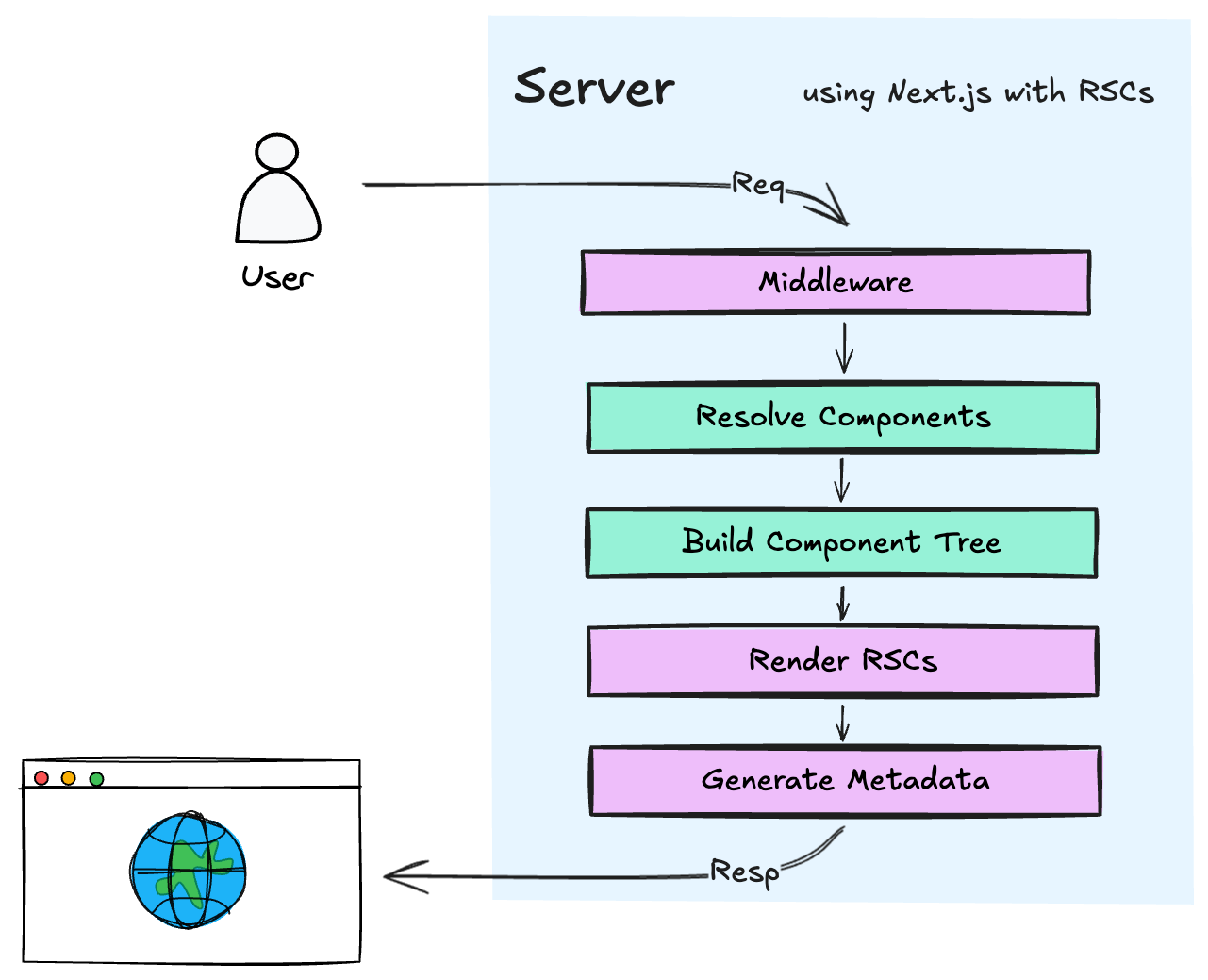
This is the sequence a Next.js process goes through for an App Router app on the first request to /problems:
- Step 1: Next.js reads the
app/tree at build time and turns everypage.tsx,layout.tsx, andloading.tsxinto a route manifest. - Step 2: A request arrives for
/problems. Next.js walks the tree from the root, collects everylayout.tsxon the way, and stops at the matchingpage.tsx. - Step 3: Every component on that path runs on the server. Async components pause at their
awaitpoints, the runtime streams whatever HTML is already ready, and the browser receives it as an incremental document. - Step 4: Any child component marked
'use client'is serialized with its props and sent to the browser as a React component bundle. - Step 5: The browser hydrates only the client components. The server components stay as pure HTML and never reach the React runtime in the browser.
Pages Router, by contrast, runs a single getServerSideProps on the server, sends the resulting props to the client, and hydrates the whole page tree in one shot. Streaming is possible in theory but nobody builds it that way, because the router is not designed for it.
Data fetching without helper functions
Pages Router treats data fetching as something that happens outside the component. You declare getServerSideProps or getStaticProps at the file level, return { props }, and the page function receives those props. This worked but it forced every data-dependent page into a specific shape, and it made it hard to share fetch logic between a page and a nested component.
App Router lets any component be async. A layout can fetch. A page can fetch. A nested server component can fetch. Each await is independent, and Next.js can start streaming the parts that are ready while the rest keeps loading. The result is that data fetching stops being a file-level concern and becomes a component-level concern, which is how React was originally supposed to work before SSR forced the detour through getInitialProps.
There is one thing to watch out for: fetch inside an App Router component is patched. Next.js deduplicates identical fetches across components in the same request and caches responses based on Next.js cache tags. If two components fetch the same URL, only one network request actually hits the network.
The one-line difference
Technically: Pages Router is a client-first file-based router with helpers for server work, App Router is a server-first file-based router with explicit opt-outs to client rendering via 'use client'.
Simpler: Pages Router ships everything to the browser and lets you peel bits back to the server. App Router keeps everything on the server and lets you peel bits forward to the browser. The direction is flipped, and that direction is where every concrete difference comes from.
Rules the routers will not bend
- Inside
pages/Next.js only looks at.tsx,.ts,.jsx,.js,.md, and.mdxfiles. Everything else is static. - Inside
app/only files namedpage.tsx,layout.tsx,loading.tsx,error.tsx,not-found.tsx,template.tsx,default.tsx, androute.tsare routing files. Any other file in the folder is a co-located private module. - A component in
app/is a server component by default. Adding'use client'at the top of the file makes it and its imports client components. Removing the directive does not switch the file back if it still calls client-only APIs likeuseState. getServerSideProps,getStaticProps, andgetInitialPropsare Pages Router only and are ignored insideapp/. The opposite is also true:asyncpage components are not supported insidepages/.- Both routers can coexist in the same project. If the same URL is defined in both trees, App Router wins. This is the intended migration path, move routes one at a time, verify in production, move the next one.
Common misconceptions
Is App Router just a rename of Pages Router with a new folder name?
No. The folder name is the smallest part of the change. App Router is a different rendering model built around React Server Components, streaming, and nested layouts. Pages Router is still the older client-first model, and the two coexist because many teams cannot migrate overnight. Treating them as cosmetic variants is the fastest way to get confused when useState starts throwing the infamous "You're importing a component that needs useState" error inside an App Router page.
Does adding 'use client' to a file make the whole page a client component?
Not exactly. 'use client' marks a boundary. The file with the directive, and everything it imports transitively, becomes client. But a parent server component can still render a 'use client' child and pass server-fetched props down. On a Next.js 14 project I migrated last quarter, the biggest surprise was how many of our leaf components needed 'use client' because they touched window or used React Context. We ended up marking about 40% of leaf components and kept the rest as server components, which turns out to be the typical split.
Should I migrate my existing Pages Router app to App Router right now?
It depends. Pages Router is still supported and receives bug fixes. Migration is useful when you want server components, streaming, or per-route layouts that Pages Router cannot give you. For a stable app with no pain points, the migration cost rarely pays off. Both routers can live in the same project, so the pragmatic move is to use App Router for new routes and leave existing routes alone until you have a concrete reason to change them.
How App Router connects to the rest of Next.js
App Router is not just a new router folder, it is the path through which new Next.js features arrive. Server Actions for mutations, partial prerendering for hybrid static and dynamic pages, the new Next.js caching model, generateMetadata for per-route SEO, parallel routes, intercepting routes, and streaming everywhere, all live on the App Router side. Pages Router gets bug fixes and the occasional compatibility patch, but the frontier is moving in one direction.
That is also why the interview question is worth answering in depth. The person asking is usually checking whether you understand the trajectory of the framework, not just which directory holds which file.
Examples
Listing posts in each router
// pages/posts/index.tsx (Pages Router)
import type { GetServerSideProps } from 'next'
type Post = { id: string; title: string }
export const getServerSideProps: GetServerSideProps = async () => {
const res = await fetch('https://api.itlead.org/posts')
const posts: Post[] = await res.json()
return { props: { posts } }
}
export default function PostsPage({ posts }: { posts: Post[] }) {
return (
<ul>
{posts.map((post) => (
<li key={post.id}>{post.title}</li>
))}
</ul>
)
}// app/posts/page.tsx (App Router)
import { db } from '@/lib/db'
export default async function PostsPage() {
const posts = await db.post.findMany({ orderBy: { createdAt: 'desc' } })
return (
<ul>
{posts.map((post) => (
<li key={post.id}>{post.title}</li>
))}
</ul>
)
}The App Router version has no exported helper, no separate function for data, and no props interface for the page. The database import lives in the page file and never reaches the client, because the whole file is a server component. That last point is the one that actually changes your bundle size.
Nested layout with streaming
// app/dashboard/layout.tsx
import { Sidebar } from '@/components/sidebar'
export default function DashboardLayout({
children,
}: {
children: React.ReactNode
}) {
return (
<div className="dashboard">
<Sidebar />
<main>{children}</main>
</div>
)
}// app/dashboard/loading.tsx
import { DashboardSkeleton } from '@/components/dashboard-skeleton'
export default function Loading() {
return <DashboardSkeleton />
}// app/dashboard/page.tsx
import { getRecentActivity } from '@/lib/activity'
export default async function DashboardPage() {
const activity = await getRecentActivity()
return (
<section>
<h1>Recent activity</h1>
<ul>
{activity.map((item) => (
<li key={item.id}>{item.description}</li>
))}
</ul>
</section>
)
}When the user navigates to /dashboard, Next.js renders the layout and the sidebar immediately, then shows DashboardSkeleton while getRecentActivity() is still pending. The moment the data is ready, the skeleton is swapped for the real content. The sidebar never re-renders, because layouts preserve state across navigation within their subtree. In Pages Router you would wire all of this yourself with useState, a spinner, and a useEffect that fetches on mount.
The subtle thing: each of these three files is independently cached. The sidebar stays hydrated when only the page content changes.
Mixing server and client in one page
Interview-style scenario. What here needs 'use client', and what does not?
// app/search/page.tsx
import { searchPosts } from '@/lib/search'
import { SearchInput } from './search-input'
export default async function SearchPage({
searchParams,
}: {
searchParams: { q?: string }
}) {
const query = searchParams.q ?? ''
const results = query ? await searchPosts(query) : []
return (
<div>
<SearchInput initialQuery={query} />
<ul>
{results.map((post) => (
<li key={post.id}>{post.title}</li>
))}
</ul>
</div>
)
}// app/search/search-input.tsx
'use client'
import { useState } from 'react'
import { useRouter } from 'next/navigation'
export function SearchInput({ initialQuery }: { initialQuery: string }) {
const [value, setValue] = useState(initialQuery)
const router = useRouter()
return (
<input
value={value}
onChange={(e) => setValue(e.target.value)}
onKeyDown={(e) => {
if (e.key === 'Enter') router.push(`/search?q=${value}`)
}}
placeholder="Search posts..."
/>
)
}The page itself is a server component. It reads searchParams, calls searchPosts on the server, and renders the results list. The SearchInput is a client component because it needs useState and useRouter for the typing experience. The page passes initialQuery down as a prop, which is fine because strings and numbers serialize cleanly across the server to client boundary.
The gotcha: you cannot pass searchPosts itself as a prop to the client component. Functions do not serialize. If the client needed to call the search, you would turn searchPosts into a Server Action with 'use server' and pass the action as the prop. This is exactly the split many teams get wrong on their first migration.
Short Answer
Interview readyA concise answer to help you respond confidently on this topic during an interview.